Analysis and dashboards
Cross-run questions ("does round success fall as channel noise rises, and by how
much?") are answered in the web UI: pick a cohort, group it, measure it, chart it,
save it. The same questions are answerable from a terminal with glossogen analyze,
which reads the runs directory directly.
The query model
Three things make a query.
Grain is what one row is. run is one row per run, round one per (run, round)
that some selected metric reported, agent one per agent on the run's registered
roster. The round and agent grains follow the same row rules as the CSV export's
tables, so a chart and the table it could have come from cover the same observations.
keyed is the fourth grain: one row per number a metric wrote along an axis of its own.
Feature presence scores a confidence per ontology category, probe similarity a number
per (agent, question, cutoff), language repetition a factor per message. None of those
fit per_round or per_agent, so the metrics wrote them to a file beside the report.
At this grain those files are read and their keys become dimensions, prefixed key.:
key.category_id, key.question_id, key.message_id. Nothing in the query path
knows what any of them mean. The metric that wrote the file declares how to read it.
Two things follow from the keys being the metric's own. Two metrics keyed differently
never share a row, so asking for both puts each one's numbers on its own rows with the
other's cell blank. And the metric's score_unit is not claimed on that axis: it
describes the run-level score (communication_feature_presence counts categories over
a threshold) while the keyed values are something else (a confidence), so the axis
carries no unit rather than the wrong one.
Dimensions are what a row can be grouped or filtered by: run metadata, knobs
(knob.*), key=value labels (label.*), bare tags (label_flag.*), per-agent
identity (agent_model.*), lineage (lineage.*), plus the grain's own keys
(round_number at the round grain, agent_id / agent_role / agent_model /
agent_provider at the agent grain). None of these come from a list anyone
maintains. They come from what the selected runs recorded.
Measures are what gets aggregated: any evaluator metric the selected runs' reports
carry, or a numeric run column (total_cost_usd, duration_seconds,
total_messages, current_round). Aggregates are mean, median, sum, count,
min, max, stddev, and sem.
A query groups by at most two dimensions: the first is the x axis, the second the series.
An empty cell is not a zero
A measure with no number is dropped before the aggregate is computed and counted as missing beside it. A run that was never evaluated therefore lowers no average, and a metric that decided it did not apply to a run does not drag it toward zero.
A measured 0.0 is the opposite: the metric ran and counted zero, and it is in the
aggregate like any other number.
Every answer carries both counts, so a mean over three runs and a mean over ninety
are told apart on sight: the chart tooltips show n, the table shows n and how many
were missing, and glossogen analyze prints both as columns.
stddev and sem over a single observation are empty rather than 0, since one
observation has no spread to report.
From the command line
# what this cohort can be grouped, filtered, and measured by
glossogen analyze --runs-dir ./runs --scenario veyru --label channel_noise --list-fields

# which communication features the cohort's protocols show, strongest first
glossogen analyze --runs-dir ./runs --scenario veyru --label baseline \
  --grain keyed --group-by key.category_id \
  --measure communication_feature_presence:mean --sort measure_descending

# one row per noise level, with the mean and the standard error of round success
glossogen analyze --runs-dir ./runs --scenario veyru --label channel_noise \
  --group-by knob.channel_noise_level \
  --measure round_success:mean --measure round_success:sem
knob.channel_noise_level  runs  obs  metric.round_success:mean  n   metric.round_success:sem  n
------------------------  ----  ---  -------------------------  --  ------------------------  --
0.2                       60    60   0.4967                     60  0.03663                   60
0.4                       60    60   0.3767                     60  0.03413                   60
0.6                       60    60   0.2011                     60  0.02765                   60
Selection flags match glossogen export: --scenario, --label, --run-id-contains,
--status, --contains-agent-id, --knob, or --run-id to name runs outright. The two
forms cannot be combined.
--knob takes one <knob><operator><value> condition on the run's recorded
scenario_config and is repeatable. Quote it when it contains > or <, or the shell
reads them as redirection. See
Filtering by knob.
Other flags:
| Flag | Does |
|---|---|
--grain run\|round\|agent\|keyed |
what one observation is |
--group-by KEY |
repeatable, at most twice |
--measure [source:]key:aggregate |
repeatable; source defaults to metric |
--filter key:operator[:values] |
repeatable; operators are in, not_in, contains, gte, lte, is_empty, is_not_empty |
--sort group\|measure_ascending\|measure_descending with --sort-measure N |
row order |
--json |
the full answer, including per-cell counts |
--list-fields |
print the dimensions and measures, then stop |
Every key a query names is checked against what the selection carries at that grain,
the same list --list-fields prints. A --group-by, --filter or --measure key the
selection does not carry is refused by name rather than answered with one group called
"" or a column of blanks, and a gte / lte filter whose bound is not a number is
refused the same way. A selection that carries no key of a kind cannot check that kind:
an empty selection, or one with runs but no rows at the asked grain, answers with an
empty result, and a cohort nothing has evaluated yet still answers a metric measure
with blanks.
Numeric groups sort as numbers, so a sweep over 800, 2000, and 10000 charts in that order, where a string sort would put 10000 first.
In the browser
Analysis on the runs page opens the surface at /g/<group>/analysis.
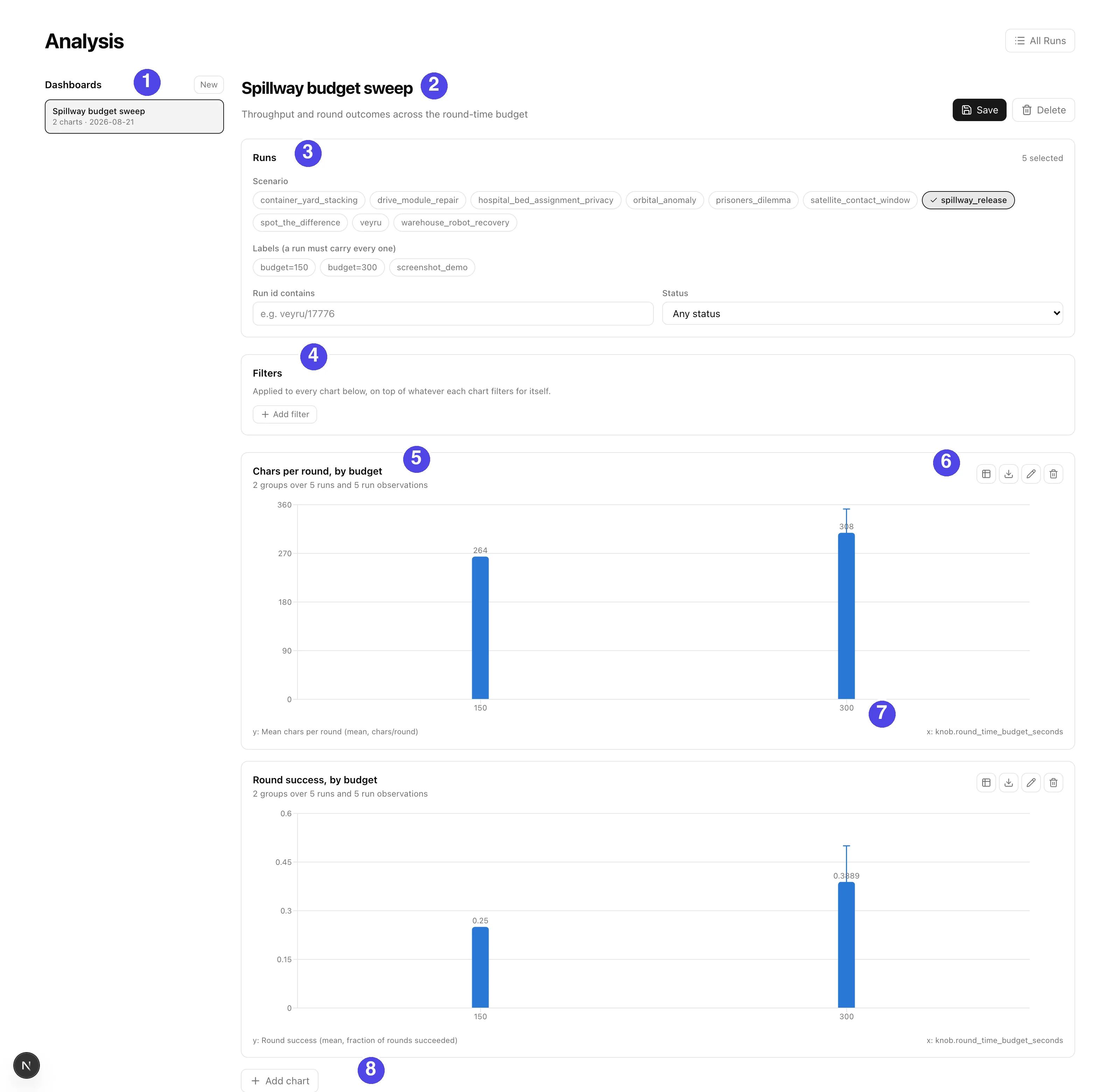
| # | What it is |
|---|---|
| 1 | Saved dashboards; New starts an empty one |
| 2 | The open dashboard, its description, and Save / Delete. Saving publishes it to everyone in the group |
| 3 | The cohort: the same filters as the runs list, shared by every chart below |
| 4 | Dashboard-level filters, applied on top of whatever each chart filters for itself |
| 5 | One chart, with how many groups, runs and observations sit behind it |
| 6 | The chart's own controls: its result table, a CSV of the rows, edit, delete |
| 7 | What the axes are: the measure with its aggregate and unit, and the grouping dimension |
| 8 | Add chart opens the builder |
A dashboard holds the cohort and the filters. Every chart on it inherits both, and a chart can narrow further with filters of its own. Re-pointing a whole study at another cohort therefore changes one control.
Bar and line charts take one grouping key (the measures are the series) or two (the second key is the series, and the first measure is drawn). Scatter places one mark per group with two measures as the axes. Heatmap needs both grouping keys. Table is the numbers.
Bar and line charts draw error bars from a second measure: add the metric twice, once
as mean and once as sem or stddev, and point the chart's "Error bars from" at the
second. A chart with no error bars says nothing about spread. One with a zero-length
bar says the spread was measured and was zero.
Every chart has the table one click away and downloads the rows behind it as CSV. A chart draws at most eight series, three on a scatter; series past that are left undrawn and the chart notes how many were hidden.
Saved dashboards
A dashboard stores queries. Reopening one re-runs them, so runs added or evaluated since it was saved show up without anyone rebuilding the chart.
Dashboards belong to a group and everyone in that group sees them. Names are unique
per group. With DATABASE_URL set they live in the dashboards table. Without one
they are JSON files under <runs-dir>/_dashboards/<group-id>/, so a checkout with no
database keeps the feature and a copied runs directory carries its analyses with it.
The endpoints
| Endpoint | Answers |
|---|---|
POST /api/g/{group}/runs/analysis/fields |
what a selection can be grouped, filtered, and measured by, at one grain |
POST /api/g/{group}/runs/analysis/query |
one grouped, aggregated result |
GET\|POST /api/g/{group}/dashboards |
list, create |
GET\|PUT\|DELETE /api/g/{group}/dashboards/{id} |
read, replace, remove |
They are POSTs for the reason the export endpoints are: a selection can name hundreds of runs, which does not fit in a URL.
A query naming a dimension or a measure the selection does not carry at that grain is
refused with 422 naming the keys, so a typo in a chart is an error rather than an empty
chart. A knob condition whose value cannot be read as the type a run recorded
(round_count>=lots) is refused the same way.
A selection matching nothing is answered with an empty result rather than refused, so
a saved dashboard pointing at a cohort that is empty today renders as "no runs match".
Runs the selection names that no longer exist come back on the answer under
missing_run_ids, since a dashboard outlives the runs it was built on. A selection
over the export's run ceiling is refused with 413.
Sidecars are read only for a keyed query. They cost one file open per metric per run, and no other grain can use them, so the record cache holds two versions of a selection, with and without them, rather than paying that cost on every chart.
Loaded runs are cached in-process for a minute per selection, so editing a chart does not re-read every run's report on each change. What is cached is a projection of each run down to its dimension cells and its numbers, 18 KB a run rather than the 156 KB its full report costs, which is what lets a scenario-wide cohort stay in the cache while someone works on it. The cache budget is counted in runs, and a selection wider than the whole budget is answered without being kept.
Limits
| Limit | Value | Why |
|---|---|---|
| Runs per selection | the export's MAX_EXPORT_RUN_COUNT |
one report read per run |
| Group-by keys | 2 | a chart has an x axis and a series |
| Result rows | 5000 | past that a chart is a download |
| Dimension values offered per filter | 200 | a picker, not a listing; the true count is reported beside it |