Web UI
A FastAPI backend and a Next.js frontend for browsing runs. One command starts both:
Open http://localhost:3000 once it is up. --ui-port starts the UI from the
published frontend container, so it needs Docker. Omit it to run the backend
alone. The server runs in your own environment, so scenarios and metrics
installed from other packages appear in the UI.
The flag runs the latest published UI, wires API_URL to the server it just
started, and adds the UI's origin to CORS. --ui-image with a version tag pins
an older UI, which an older server needs, since a current UI calls endpoints it
may not serve.
From a checkout, run the two as dev processes instead, one terminal each:
make dev            # terminal 1: FastAPI backend on port 8000 (reads ./runs/)
make dev-frontend   # terminal 2: Next.js dev server on port 3000
The dev frontend reads frontend/.env.local, copied from
frontend/.env.local.example. Its one required variable is API_URL, the
backend's URL. It is read at request time and forwarded to the browser by the
root layout, never compiled into the bundle, so changing it takes a restart.
Pointing the checkout UI at a server on another port makes two settings yours
to keep in step: API_URL, and the backend's ALLOWED_ORIGINS, which
defaults to http://localhost:3000. A UI served from an unlisted origin
renders pages whose API calls are refused by CORS, which shows up as an empty
run list rather than as an error.
The runs page
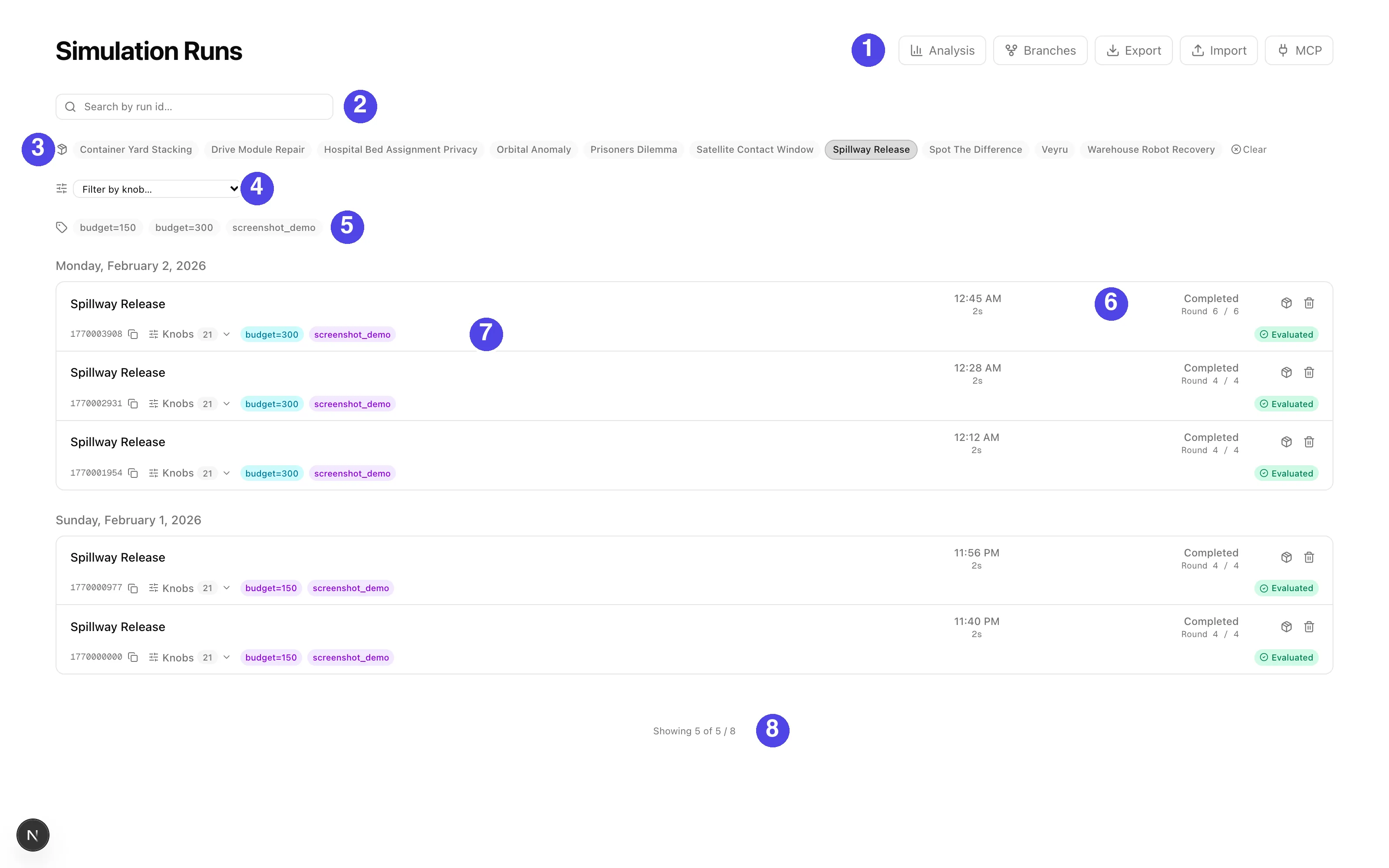
| # | What it is |
|---|---|
| 1 | Navigation: Analysis (cross-run charts), Branches (lineage), Export and Import (move runs out as CSV or archives, or in from another deployment), and MCP connection instructions |
| 2 | Search by run id substring |
| 3 | Scenario filter, one chip per installed scenario. Selecting exactly one reveals the knob filter bar, item 4 |
| 4 | The knob filter bar, covered below |
| 5 | Label filter, AND-matched: a run must carry every selected label |
| 6 | A run row: when it started, how long it ran, what it cost, its status (in-progress runs are listed too), and the round it reached |
| 7 | The run's id with a copy button, a Knobs dropdown listing the full recorded config, the run's labels, and its evaluation status. Derived runs carry lineage badges here (fork, replace-agent, cross-run, fork-at-round) |
| 8 | The result count: how many runs the knob conditions kept, out of what the other filters left |
Filtering by knob
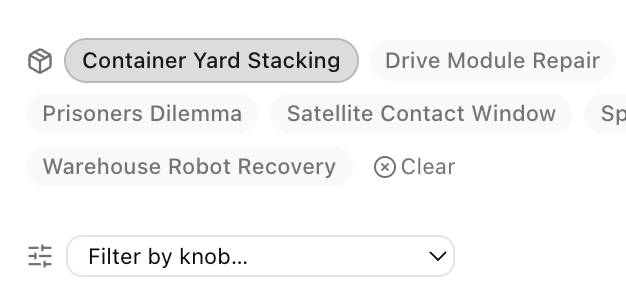
Select a single scenario and a filter bar appears offering that scenario's
knobs. Pick a knob, a comparison and a value, and press Add. Conditions
accumulate as chips and every one has to hold. The comparisons on offer follow
the knob's type: a number takes >= <= > < = !=, a boolean takes true or false, an enum
takes one of its own values, and a knob that can be left unset gets a "not set"
box.
The knobs come from the scenario's own schema, so a scenario installed from another package is filterable with no change to the platform.
The same conditions travel to the CSV and raw exports, to glossogen export
--knob and glossogen analyze --knob, and to the export endpoints as the
selection's knob array. See
Filtering by knob for the grammar.
Analysis opens the cross-run surface: pick a cohort, group and filter it, chart metrics from the evaluation reports, and save the result as a dashboard the rest of the group can open. See analysis and dashboards.
Inside a run
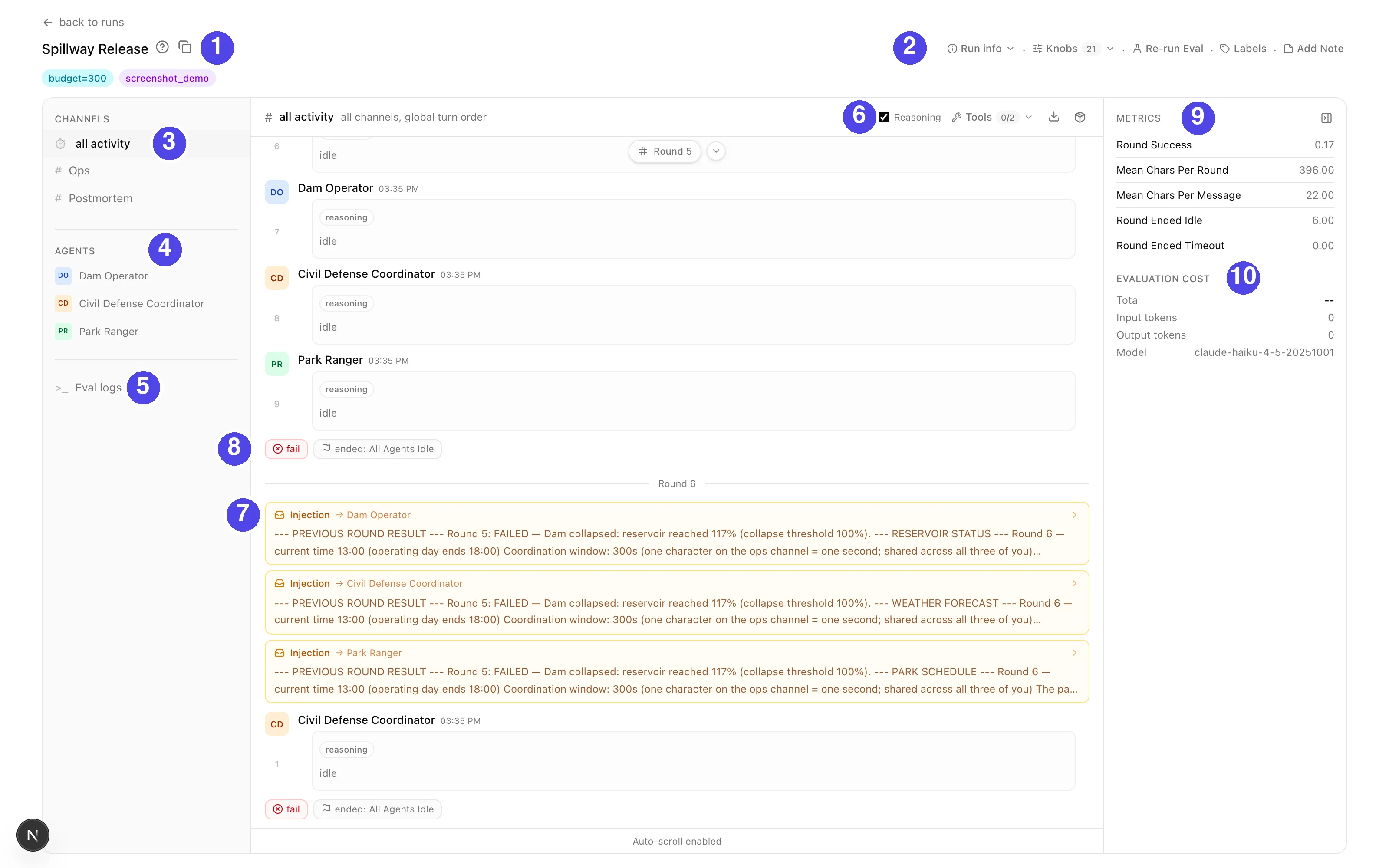
| # | What it is |
|---|---|
| 1 | The run: scenario, a copyable id, and its labels |
| 2 | Run info and actions: the recorded knobs, re-running evaluation, editing labels, attaching a note |
| 3 | Channel tabs: every channel's messages interleaved in send order, or one channel at a time |
| 4 | Agent tabs: the run as one agent saw it. A seat swapped mid-run gets one tab per occupant |
| 5 | The evaluation log, when an evaluation has run |
| 6 | Timeline controls: show or hide reasoning, filter tool calls, export the run as a PDF or a bundle |
| 7 | An injection: the briefing the scenario handed one agent at the start of the round |
| 8 | The round's verdict and why it ended (agents idle, timeout, or the scenario's own trigger) |
| 9 | The evaluation report's headline scores |
| 10 | What the evaluation itself cost, and the judge model it ran under |
Live streaming
Every glossogen run starts an embedded streaming server on an ephemeral port and
writes a stream.json discovery file into the run directory. When the web server
sees that file it proxies the simulation's SSE stream to connected browsers,
including token-by-token deltas, so text appears as agents generate it. When the
simulation ends, stream.json is deleted and the server falls back to tailing the
JSONL.
Run labels
Labels are short tags on a run, for filtering and grouping. Add or edit them with the run page's Labels control, and filter the runs list by them: a run must carry every selected label. There is no way to set them at launch, so label a run once it appears in the list.
On disk a run's labels are labels.json in its run directory, a JSON list of
strings, so scripts can read and write them too:
| Way | How | Note |
|---|---|---|
| The API | PUT /api/g/{group_slug}/runs/{scenario}/{run_dir_name}/labels with body {"labels": [...]} |
Replaces the whole list, so read the current labels first when adding to them |
| A direct file write | Write labels.json as soon as the run directory exists |
What orchestrator scripts do: faster, and needs no backend running |
On a server backed by a database, label filtering and the filter dropdown read a mirror of that file kept on the run's index row. Rows never mirrored are backfilled at server startup. After that a direct file write reaches the mirror only when the server next reads the file (the run appearing on a listed page, its detail opening, or an export the run matches). Until then a label-filtered view can miss the run. Labels applied through the API are visible immediately.
glossogen evaluate no longer writes labels.json, so eval:* labels exist
only on runs evaluated before that changed.
Describing a label
A group keeps a glossary of what each label means, keyed on the exact label string, so a description covers every run carrying that label. The UI shows it when you hover a label chip. Record one when you create a cohort label, so the next reader does not have to reverse-engineer what the cohort was for.
| From | Set | Read |
|---|---|---|
| The CLI, on the local group | glossogen describe-label <label> --description "..." |
glossogen list-label-descriptions |
| The API | PUT /api/g/{group_slug}/labels/descriptions with body {"label": ..., "description": ...} |
GET on the same path |
The label travels in the body or a query parameter, never the path, because
labels such as src=veyru/123 carry slashes. describe-label --delete removes
a description. sync-metadata-to-prod
copies the local glossary to a remote.
Authentication modes are covered under Deployment, and the identity-provider contract in Creating an identity provider.